
Getting BTCpayServer to work properly on Umbrel can be a bit finicky if you don’t know what to look for. The way proposed in the guide below was verified as working by multiple users in late 2025 and early 2026, and should contain everything you need to know.
Prerequisites
- A domain/subdomain with a DNS A record pointing to your public IP
- Router access for port forwarding
- Alternatively, a Cloudflare Tunnel or Wireguard setup
Step 1: Configure Port Forwarding
Forward these ports on your router to your Umbrel server:
| External Port | Internal Port |
|---|---|
| 443 | 40443 |
| 80 | 40080 |
Step 2: Install Nginx Proxy Manager
Install Nginx Proxy Manager from the official Umbrel App Store.
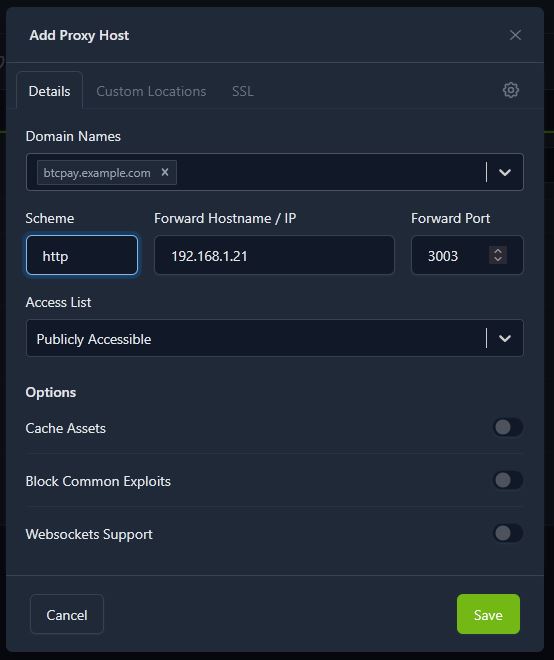
Step 3: Create a Proxy Host
- Log into Nginx Proxy Manager
- Create a new Proxy Host:
- Domain: Your domain/subdomain
- Scheme:
http - Forward Hostname/IP: Your Umbrel’s local IP
- Forward Port:
3003
- Save the host
Step 4: Enable SSL
- Edit the host you just created
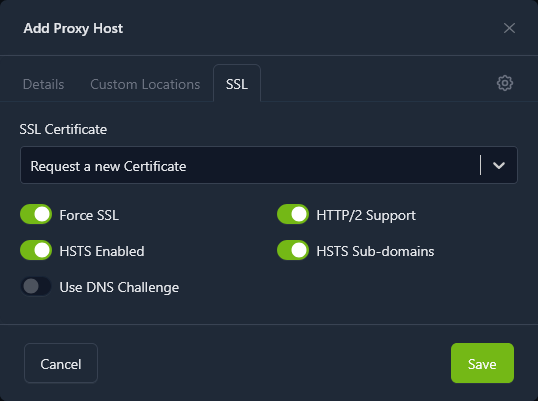
- Go to the SSL tab
- Request a new Let’s Encrypt certificate
- Enable all four slider options
- Save
Troubleshooting: Find Container Ports
If you need to verify which port BTCPay is using:
ssh umbrel@umbrel.local
sudo docker ps -a
This will show you a list of all containers and their mapped ports. Nginx Proxy Manager can also route directly to container names if needed.
That’s it — your BTCPay Server should now be accessible via HTTPS.