
Bitcoin mining has fundamentally changed since Satoshi Nakamoto mined the first block on a simple computer. What was once a niche hobby for tech enthusiasts and nerds has become a global industry. The good news: thanks to open-source hardware, home mining is now more accessible than ever, and we’re advancing rapidly.
Whether you want to contribute to Bitcoin’s decentralization, understand how the network really works, experience the thrill of solo mining, or simply stack sats while heating your home, the topic is so extensive that it’s impossible to cover every detail, but this guide should give you a great starting point! Ready? Let’s go!
Bitcoin Mining for Beginners 2026
Table of Contents
- What is Bitcoin Mining?
- Why Start Mining in 2026?
- The Equipment Checklist
- Choosing the Right Miner
- The Open-Source Revolution
- Electrical Requirements and Safety
- Power Supplies: The Foundation of Stable Mining
- Network and Internet
- Cooling and Heat Management
- Bitcoin Wallets for Mining Earnings
- Pool Mining vs. Solo Mining
- Step-by-Step Setup
- Understanding Profitability
- Firmware and Overclocking
- Maintenance and Troubleshooting
- The Future of Home Mining
- The Genesis Block: Where It All Began
- David vs. Goliath: Solo Mining Success Stories
- Fun Facts and Curiosities
- Current Bitcoin Network Statistics
- Frequently Asked Questions
What is Bitcoin Mining?
The Simple Explanation
Bitcoin mining is the process where specialized computers validate transactions and add them to the public Bitcoin database (the blockchain). Miners compete to solve complex mathematical puzzles. The winner gets to add the next “block” of transactions to the chain and receives newly created bitcoins plus user transaction fees as a reward.
The Technical Explanation
Miners repeatedly run the SHA-256 hash algorithm on block header data. They change a variable called “nonce” with each attempt, searching for a hash result that meets the network’s difficulty requirements. Essentially, it’s a massive guessing game where miners perform trillions of attempts per second.
When a miner finds a valid hash, they broadcast the block to the network. Other nodes verify it, and if valid, it gets added to the blockchain. Sounds simple, right?
Key Terms
| Term | Meaning |
|---|---|
| Hashrate | The number of hash calculations per second. Measured in TH/s (terahashes per second). Higher = more chances to find a block. |
| Block Reward | The bitcoin reward for the miner who successfully adds a block. Currently 3.125 BTC after the April 2024 halving. |
| Difficulty | A measure of how hard it is to find a valid hash. Adjusts every 2,016 blocks (about 2 weeks). |
| ASIC | Application-Specific Integrated Circuit. A chip designed exclusively for one task – here: SHA-256 hashing for Bitcoin. |
| J/TH | Joules per terahash. Efficiency metric. Lower values mean more hashrate per watt of electricity. |
| Nonce | “Number used once.” The variable that miners change when searching for a valid hash. |
| Stratum | The protocol for communication between miner and pool. Format: stratum+tcp://pool.address:port |
| Share | A partial solution sent to a pool. Pools pay based on submitted shares. |
Why Mining Matters
Mining serves three critical functions:
- Security: The computational work required makes it prohibitively expensive to attack the network or reverse transactions.
- Transaction Processing: Miners select which transactions get included in blocks and confirm them for the network.
- New Bitcoin Issuance: Mining is the only way new bitcoins enter circulation, following a predefined schedule up to a maximum of 21 million.
Every miner, no matter how small, contributes to Bitcoin’s decentralization and security.
Why Start Mining in 2026?
With record network difficulty, you might wonder if mining still makes sense. Here’s why hundreds of thousands are starting home mining now:
| Motivation | Description | Recommended Miner |
|---|---|---|
| Learning | Hands-on understanding of how Bitcoin works at the protocol level | Bitaxe Gamma (~€100) |
| Decentralization | Moving hashrate away from large pools strengthens Bitcoin’s security model | Any home miner + your own node |
| Lottery Mining | Small chance at massive reward (3.125 BTC = €300,000+) | NerdQaxe++ (~€400) |
| Regular Sats | Pool mining for small, predictable payouts | Any miner + pool |
| Heat Utilization | Using mining heat for heating – essentially free heating that pays you | Avalon Mini 3 (~€1,100) |
| Non-KYC Bitcoin | Acquiring bitcoin without exchanges, identity verification, or third parties | Solo mining with your own node |
The Home Mining Renaissance
For years, Bitcoin mining was dominated by industrial operations in regions with cheap electricity. But open-source hardware projects have changed the game. Devices like the Bitaxe bring real ASIC mining power into a package that sits quietly on your desk, runs on a regular outlet, and costs less than many consumer electronics.
It’s not about competing with industrial miners on profitability. It’s about participating in Bitcoin in a way that buying never offers.
The Equipment Checklist
Before you start, gather everything. A missing component means delays once your miner arrives.
Essential Equipment
| Component | Purpose | Home Miner | Industrial Miner |
|---|---|---|---|
| ASIC Miner | The device that performs hash calculations | Bitaxe, NerdQaxe, or Avalon Nano | Antminer S21, Whatsminer M60 |
| Power Supply | Converts AC to DC power | Included with most shops | APW12 or comparable (240V) |
| Internet Connection | Communicates with pool/node | WiFi (built into Bitaxe/NerdQaxe) | Ethernet recommended |
| Bitcoin Wallet | Receives your mining earnings | Hardware wallet recommended | Hardware wallet recommended |
| Cooling | Removes heat from miner | Built-in fans (sufficient for most) | Dedicated ventilation/AC |
| Circuit | Delivers power safely | Standard 120V/230V outlet | Dedicated 240V circuit |
Optional but Recommended
- Upgraded Heatsink: For overclocking
- Premium Thermal Paste: Thermal Grizzly Kryonaut for maximum heat transfer
- External Fan: Additional cooling for aggressive overclocking
- Bitcoin Node: Umbrel, Start9, or RaspiBlitz for true solo mining
- UPS (Uninterruptible Power Supply): Protection from power fluctuations
Choosing the Right Miner
This is the most important decision. The right miner depends on your goals, budget, living situation, and electrical infrastructure.
Home Miner Comparison 2026
| Miner | Hashrate | Power Consumption | Efficiency | Noise | Price | Ideal For |
|---|---|---|---|---|---|---|
| Bitaxe Gamma 602 | 1.2 TH/s (1.84 OC) | 15-20W | ~15 J/TH | <40 dB | ~€100 | Beginners, learning |
| Bitaxe GT 801 | 2.15 TH/s | 43W | ~18 J/TH | <40 dB | ~€220 | Ambitious home miners |
| NerdQaxe++ Rev 6.1 | 6+ TH/s | ~102W | ~16.5 J/TH | <45 dB | ~€400 | Maximum home hashrate |
| Avalon Nano 3S | 4 TH/s | ~80W | ~20 J/TH | Quiet | ~€300 | Plug-and-play, heating |
| Avalon Mini 3 | 37.5 TH/s | ~1,100W | ~29 J/TH | Moderate | ~€1,100 | Heater replacement |
| Antminer S21 | 200 TH/s | ~3,500W | ~17.5 J/TH | ~75 dB | €2,000+ | Industrial/separate room |
Understanding the Numbers
Hashrate (TH/s): Terahashes per second. The Bitaxe Gamma at 1.2 TH/s performs 1,200,000,000,000 hash calculations every second. Sounds impressive until you realize the entire Bitcoin network runs at over 800,000,000 TH/s (800 EH/s). Your share is tiny, but each hash is a lottery ticket.
Efficiency (J/TH): Critical for profitability. The Bitaxe Gamma at 15 J/TH uses 15 joules of energy to produce one terahash. Lower is better. The NerdQaxe++ at 16.5 J/TH is remarkably efficient for a quad-chip miner.
Noise (dB): Home miners stay under 45 dB, comparable to a quiet conversation or refrigerator hum. Industrial miners hit 75+ dB – as loud as a vacuum cleaner running continuously.
Detailed Miner Descriptions
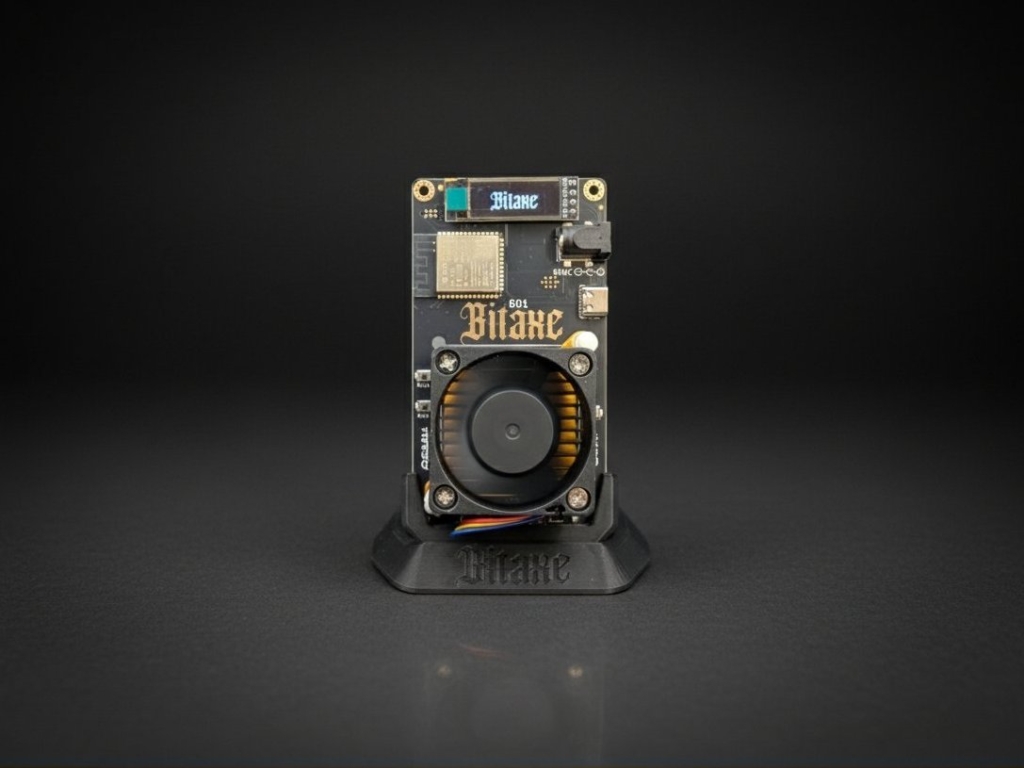
Bitaxe Gamma 602: The Perfect Entry Point
The Bitaxe Gamma uses a single BM1370 ASIC chip – the same chip found in Bitmain’s industrial S21 Pro miners. At stock settings, it delivers 1.2 TH/s at only 15-20 watts. With proper cooling, it can be overclocked to up to 1.84 TH/s.
Why it’s ideal for beginners:
- Under €105 complete with power supply
- Runs on any standard outlet
- WiFi setup takes 5 minutes
- Quiet enough for bedroom or office
- Open-source hardware you truly own
- Entry point to understanding Bitcoin mining
Bitaxe Gamma on Sale
NerdQaxe++ Revision 6.1: Maximum Home Mining Power
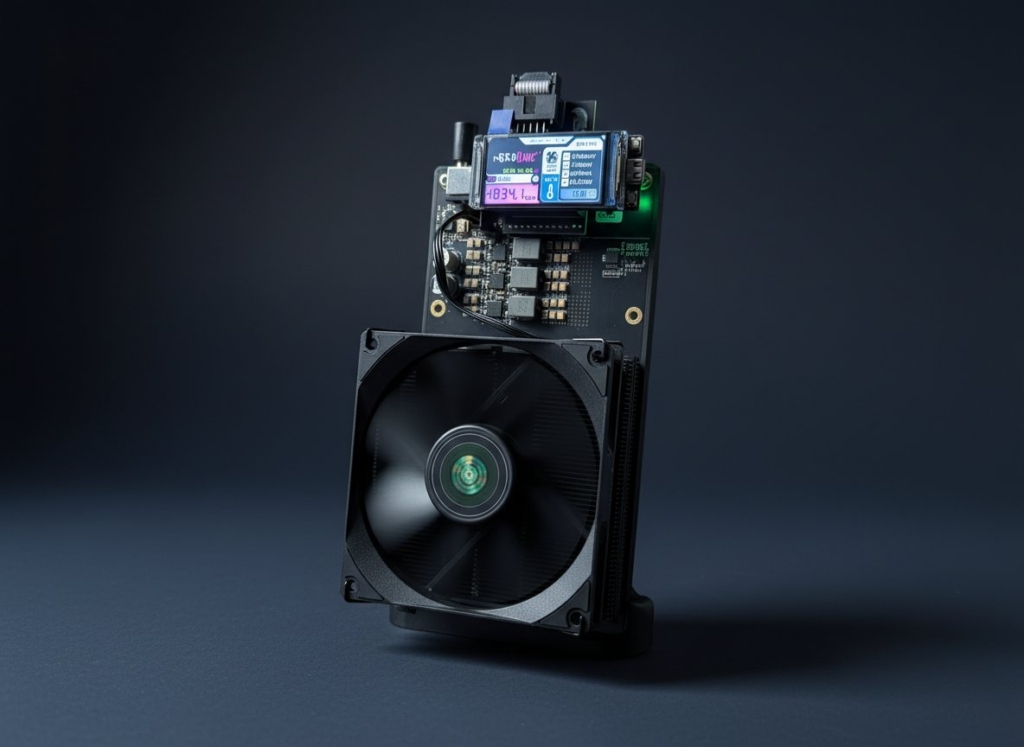
The NerdQaxe++ packs four S21 Pro ASIC chips onto one board, delivering over 6 TH/s at about 100 watts. Revision 6.1 brings thicker copper traces, repositioned temperature sensors, and improved power delivery for better efficiency and lower operating temperatures.
Key features:
- Quad-chip design for 5x the hashrate of a Bitaxe Gamma
- 1.96″ display with live statistics, Bitcoin price, network data
- ESP32-based web interface for easy management
- ~16.5 J/TH efficiency rivals industrial miners
- Still quiet enough for home use
A home miner with a NerdQaxe++ recently found a solo block worth over $280,000. It happens.
NerdQaxe++
Available here
Canaan Avalon Series: Mining Meets Heating
The Avalon Nano 3S and Avalon Mini 3 take a different approach: they’re designed as space heaters that mine Bitcoin. Instead of wasting electricity to generate heat that does nothing, these devices generate heat AND Bitcoin.
The Avalon Mini 3 at 37.5 TH/s and 1,100W outputs serious heat – equivalent to a 1,100W space heater. During winter months, your heating bill essentially becomes mining income.
Industrial Miners: A Word of Warning
Machines like the Antminer S21 deliver massive hashrate (200 TH/s) but require:
- 240V dedicated circuit (no regular outlets)
- 10-15 amps at 240V per unit
- Dedicated circuit with appropriate breaker
- Potentially upgraded electrical service
- Dedicated ventilation or separate building
- Sound insulation (75 dB is LOUD)
Without a garage, shed, or dedicated mining room with appropriate electrical infrastructure, industrial miners aren’t suitable for home use.
The Open-Source Revolution
The Bitaxe and NerdQaxe represent something bigger than just small miners. They’re part of an open-source movement returning mining power to individuals.
What “Open-Source” Means for Miners
| Aspect | Proprietary Miners (Bitmain, etc.) | Open-Source Miners (Bitaxe, NerdQaxe) |
|---|---|---|
| Hardware Schematics | Closed, proprietary | Publicly available on GitHub |
| Firmware | Closed-source, manufacturer-controlled | Open-source, community-developed |
| Backdoors | Unknown, some documented concerns | Code auditable by anyone |
| Modifications | Void warranty, legally gray | Encouraged, community shares improvements |
| Kill Switch | Theoretically possible | Impossible, you control the code |
| Community | Limited to user forums | Active development, constant improvements |
Why This Matters
When you buy a Bitaxe, you’re not just buying a miner. You’re joining a global community of developers and miners who continuously improve the firmware, share overclocking profiles, develop monitoring tools, and push the boundaries of what these devices can do.
Updates are regularly released through the open-source esp-miner firmware. The community has developed everything from auto-tuning algorithms to real-time power reporting. This is mining hardware that gets better over time.
Electrical Requirements and Safety
Understanding your electrical needs prevents fires, equipment damage, and tripped breakers. Requirements vary dramatically between home miners and industrial units.
Electrical Requirements for Home Miners
| Miner | Voltage | Power Draw | Circuit | Outlet Type |
|---|---|---|---|---|
| Bitaxe Gamma | 5V DC | 15-20W | Any standard circuit | Regular outlet (via power supply) |
| Bitaxe GT | 5V DC | 43W | Any standard circuit | Regular outlet (via power supply) |
| NerdQaxe++ | 12V DC | ~102W | Any standard circuit | Regular outlet (via power supply) |
| Avalon Nano 3S | 120V/230V AC | ~80W | Any standard circuit | Regular outlet |
| Avalon Mini 3 | 120V/230V AC | ~1,100W | Dedicated 15A circuit recommended | Regular outlet (check load) |
Important: Most home miners ship with appropriate, tested power supplies and work on standard 120V/230V household outlets. No electrician required.
Electrical Safety Rules
- Never overload circuits: A standard 15A/120V circuit handles max 1,800W. Leave 20% headroom (use max 1,440W).
- No daisy-chaining: Never plug power strips into power strips.
- Inspect regularly: Check plugs and cables for heat, discoloration, or damage.
- Use quality components: Cheap power supplies cause fires.
- Calculate load: Use Ohm’s Law to determine safe loads.
Ohm’s Law Quick Reference
| Calculation | Formula | Example |
|---|---|---|
| Power (Watts) | Voltage × Amps | 120V × 10A = 1,200W |
| Amps | Watts ÷ Voltage | 500W ÷ 120V = 4.17A |
| Voltage | Watts ÷ Amps | 1,000W ÷ 8.33A = 120V |
Power Supplies
A quality power supply isn’t optional. Unstable power causes hashrate fluctuations, crashes, and hardware damage.
Power Supply Specifications by Miner
| Miner | Included PSU | Voltage | Amps | Watts | Connector |
|---|---|---|---|---|---|
| Bitaxe Gamma | 5V/6A PSU | 5V DC | 6A | 30W | Barrel plug |
| Bitaxe GT | 5V/6A PSU | 5V DC | 6A | 30W | Barrel plug |
| NerdQaxe++ | 12.4V/10A PSU | 12.4V DC | 10A | 124W | XT30 connector |
When to Upgrade the Power Supply?
The included power supplies are adequate for stock settings. However, aggressive overclocking increases power draw. To push a Bitaxe Gamma above 1.5 TH/s, the Mean Well LRS-50-5 (50W, 5V, 10A) provides additional headroom with industrial quality.
Signs of inadequate power supply:
- Hashrate fluctuations or drops under load
- Miner crashes or restarts unexpectedly
- Power supply becomes excessively hot
- Voltage readings in AxeOS show instability
Network and Internet
Good news: Bitcoin mining requires almost no bandwidth. Bad news: it requires constant uptime.
Bandwidth Requirements
| Setup Size | Required Bandwidth | Typical Home Internet | Result |
|---|---|---|---|
| 1 miner | <1 Mbps | 50+ Mbps | More than sufficient |
| 5 miners | <5 Mbps | 50+ Mbps | More than sufficient |
| 20 miners | <20 Mbps | 50+ Mbps | Still sufficient |
Mining data consists of tiny packets: your miner sends hash results to the pool, the pool sends new work. This uses almost nothing compared to video streaming or downloads.
What Really Matters: Latency and Uptime
Latency: The time it takes for data to travel between your miner and the pool. High latency means delayed share submissions and potentially “stale” shares that don’t count. Choose pools with servers near you.
Uptime: Mining only happens when connected. Every minute offline is lost hashrate. Stable internet is more important than fast internet.
WiFi vs. Ethernet
WiFi (Built into Bitaxe/NerdQaxe):
- Convenient, no cable routing
- Works perfectly for 1-5 miners
- Position the miner within good signal range
- 5GHz preferred over 2.4GHz due to less interference
Ethernet (Recommended for maximum stability):
- Most reliable connection – no signal loss, no interference
- No disconnections from router restarts or WiFi congestion
- Required for industrial miners without WiFi
- Ideal for remote locations (basement, garage, barn)
- Use gigabit switches for future-proofing
LAN Adapters for Bitaxe and NerdQaxe
For maximum network stability, you can retrofit your Bitaxe or NerdQaxe with a LAN adapter. These small expansion modules transform the WiFi-only miner into a wired Ethernet miner.
Why Ethernet over WiFi?
Mining is a 24/7 operation. Every connection interruption means lost hashrate. WiFi is vulnerable to interference from other devices, microwaves, neighbors’ networks, and router restarts. An Ethernet cable doesn’t have these problems.
The LAN adapters use the W5500 Ethernet controller – a proven chip with its own TCP/IP stack. This means: network processing runs in hardware, not software. This offloads the ESP32 processor and provides more stable, predictable performance.
Intelligent Fallback System:
The modified firmware automatically detects whether an Ethernet cable is connected. If Ethernet is available, it’s preferred. If the wired connection fails, the miner seamlessly switches back to WiFi – without manual intervention.
Available LAN Adapters:
| Adapter | Compatible with | Price |
|---|---|---|
| Bitaxe LAN Adapter | Bitaxe 601, 602 (401, 402 FW coming soon) | €25 |
| NerdQaxe LAN Adapter | NerdQaxe, NerdQaxe+, NerdQaxe++, Octaxe, Octaxe Gamma, NerdQX | €25 |
What’s Included?
- ESP extension board
- Ribbon cable
- Ethernet module with RJ45 port
- 3D-printed case
Installation:
The Bitaxe LAN Adapter connects via the Accessory Port (BAP) – a two-part adapter that plugs onto the back of the Bitaxe.
The NerdQaxe LAN Adapter sits between the OLED display and the mainboard. Installation is slightly more involved but completed in a few minutes (video tutorials available).
Firmware Update Required:
The standard firmware doesn’t support Ethernet. You need to flash a modified version:
- Bitaxe: ESP-Miner-LAN Firmware
- NerdQaxe: ESP-Miner-NerdQAxePlusLAN Firmware
- Web Flasher (no download needed): lnbits.molonlabe.holdings/tnaflasher/public
The LAN firmware is based on the official ESP-Miner firmware and offers all familiar features plus Ethernet support with DHCP or static IP configuration.
Technical Details for the Curious:
The W5500 communicates via SPI with the ESP32-S3. The wiring uses GPIO 39-42, which are by default assigned to the BAP port. This means: Ethernet or BAP – not both simultaneously (with default pin assignment).
For best performance: Ethernet cables up to 100m possible, automatic 10/100 Mbit speed detection, ~150mA additional power consumption.
Find all mining products at: https://www.gobrrr.me/shop/?categories=mining
Cooling and Heat Management
Every watt your miner consumes becomes heat. Managing this heat is essential for hardware longevity, stable hashrate, and comfortable living spaces.
Heat Output by Miner
| Miner | Power Draw | Heat Output (BTU/h) | Equivalent |
|---|---|---|---|
| Bitaxe Gamma | 20W | ~68 BTU/h | A light bulb |
| Bitaxe GT | 43W | ~147 BTU/h | A laptop under load |
| NerdQaxe++ | 102W | ~348 BTU/h | A small desktop PC |
| Avalon Mini 3 | 1,100W | ~3,750 BTU/h | A 1,100W space heater |
| Antminer S21 | 3,500W | ~11,940 BTU/h | A small room heater |
Conversion: 1 Watt = 3.412 BTU/h
Temperature Guidelines
ASIC Chip Temperature:
- Ideal: Under 60°C
- Acceptable 24/7: 60-65°C
- Caution: 65-70°C
- Throttling likely: Over 70°C
- Shutdown: Over 75-80°C (varies by firmware)
Ambient Room Temperature:
- Ideal: 18-24°C (64-75°F)
- Maximum: 38°C (100°F)
- Humidity: Under 90%
Cooling Solutions
For Standard Operation
Home miners ship with fans adequate for stock settings at normal room temperatures. Place them in a ventilated area and you’re good to go.
For Overclocking
Pushing a Bitaxe Gamma above 1.5 TH/s requires enhanced cooling:
- Upgraded Heatsink: A fin-pin heatsink improves heat dissipation dramatically
- Premium Thermal Paste: Thermal Grizzly Kryonaut or comparable high-performance paste
- External Fan: 120mm fan directing airflow over the board
- Cooler Ambient Temperature: Air conditioning or basement location
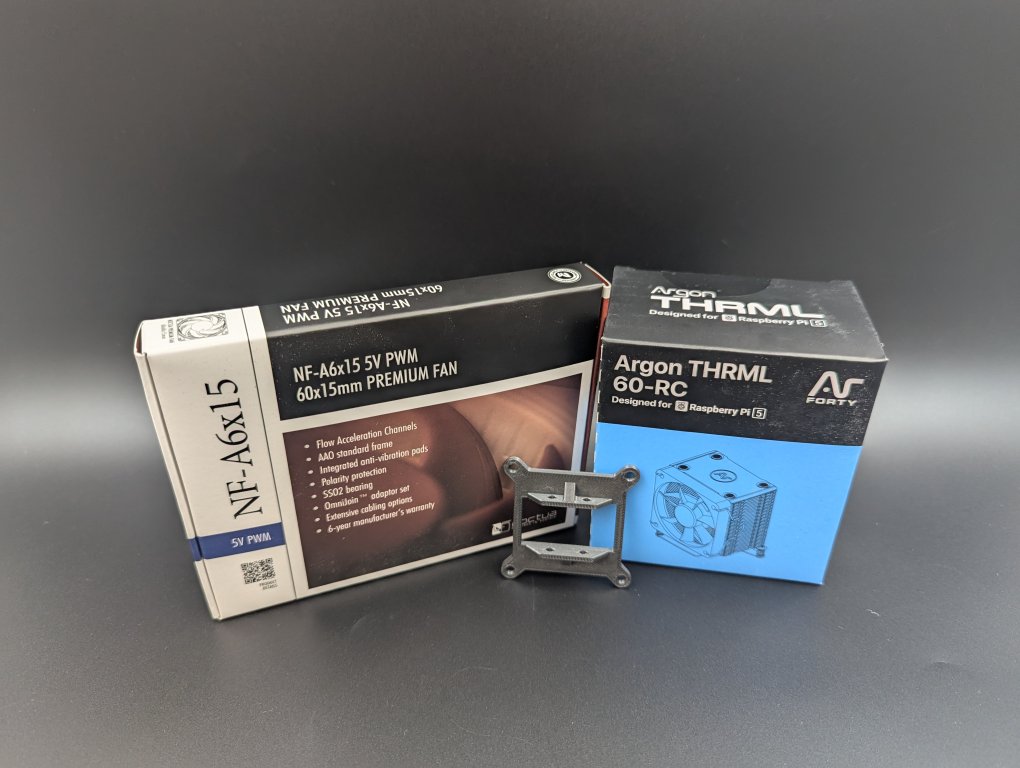
We recommend getting our Bitaxe Argon THRML Upgrade Kit if you want to get started with overclocking easily. It contains everything you need.
For Mining Heaters
Bitaxe THRML Upgrade Kit
The Avalon series is designed to radiate heat into your room. Position it like a space heater: away from walls, furniture, and curtains. The heat isn’t waste – it’s the purpose.
Bitcoin Wallets
Your Bitcoin wallet receives your mining payouts. Choosing the right wallet and understanding address types matters for security and cost efficiency.
Bitcoin Address Types Explained
| Address Type | Starts With | Transaction Fees | Compatibility | Recommendation |
|---|---|---|---|---|
| Legacy | 1 | Highest | Universal | Avoid unless required |
| Nested SegWit | 3 | Medium | Widespread | Acceptable |
| Native SegWit | bc1q | Low | Most pools/exchanges | Recommended |
| Taproot | bc1p | Lowest | Growing support | Best if supported |
Native SegWit (bc1q) addresses are the current sweet spot: low fees and broad compatibility. Taproot (bc1p) offers the lowest fees, but check if your pool supports it.
Wallet Types Compared
| Wallet Type | Security | Convenience | Control | Ideal For |
|---|---|---|---|---|
| Exchange Wallet | Low (not your keys) | High | None | Never for storage |
| Mobile Hot Wallet | Medium | High | Full | Small amounts while learning |
| Desktop Wallet | Medium-High | Medium | Full | Active use, moderate amounts |
| Hardware Wallet | Highest | Medium | Full | All serious storage |
Recommendation: Hardware Wallets
For Bitcoin miners, we recommend hardware wallets like:
- Blockstream Jade Plus: Fully open-source, air-gapped operation via QR codes, affordable
- Foundation Passport: Premium device, easy to use
- SeedSigner: DIY air-gapped solution you build yourself – various kits available
Hardware Wallets and Cold Storage: gobrrr.me/shop/cold-storage/
The Golden Rule
Not your keys, not your coins.
Don’t leave Bitcoin on exchanges. History is full of exchange hacks (Mt. Gox, Bitfinex), insolvencies (FTX, Celsius), and frozen withdrawals. When you mine Bitcoin, withdraw it to your own wallet where you control the private keys.
Pool Mining vs. Solo Mining
This choice fundamentally shapes your mining experience. Understand both options before configuring your miner.
Pool Mining Explained
Mining pools combine hashrate from thousands of miners. When the pool finds a block, the reward (3.125 BTC + fees) is distributed to all participants based on contributed hashrate. You earn small, consistent payments instead of waiting for a solo block that might never come.
Pool Mining Economics
| Your Miner | Hashrate | Approximate Daily Pool Earnings* | Payout Frequency |
|---|---|---|---|
| Bitaxe Gamma | 1.2 TH/s | ~60-100 sats ($0.05-0.10) | When threshold reached |
| Bitaxe GT | 2.15 TH/s | ~100-180 sats ($0.10-0.18) | When threshold reached |
| NerdQaxe++ | 6 TH/s | ~300-500 sats ($0.30-0.50) | When threshold reached |
Estimates vary with difficulty, Bitcoin price, and pool fees.
Choosing a Pool
Key factors:
- Fee: Typically 1-2%. Lower is better.
- Payout structure: PPLNS (Pay Per Last N Shares), PPS (Pay Per Share), etc.
- Server location: Closer = lower latency = fewer stale shares
- Minimum payout: How much must accumulate before payout
- Reputation: Stick with established pools
Popular Pools: Braiins Pool, ViaBTC, Ocean, F2Pool, Public Pool
Solo Mining Explained
Solo mining means you mine independently and keep the entire block reward if you find one. The catch: with a 1.2 TH/s miner against an 800+ EH/s network, your odds per block are about 1 in 666,666,666,666.
But here’s the thing: blocks are found every ~10 minutes. That’s 144 chances per day. Over a year, that’s 52,560 chances. It’s a lottery, but a lottery where someone wins every 10 minutes.
Solo Mining Requirements
- Bitcoin Node: You need a full node to construct and validate blocks. Options:
- Umbrel on Raspberry Pi or mini PC (DIY option)
- Start9 Server (plug and play)
- Bitcoin Core on a dedicated computer
- RaspiBlitz
- Mining Software: Public Pool or self-hosted pool software
- Patience: You might mine for years without finding a block
Lottery Mining: The Middle Ground
“Lottery mining” uses pools that operate in solo mode. Each miner tries to find blocks independently but shares the infrastructure. Pools like Public Pool and CK Pool offer this with zero fees.
Lottery Mining Benefits:
- No own node required
- No pool fees
- Full block reward if you hit
- Easy setup (just point your miner at the pool)
Which Should You Choose?
| Choose Pool Mining if… | Choose Solo/Lottery Mining if… |
|---|---|
| You want consistent (small) income | You enjoy the thrill of potentially huge rewards |
| You track ROI precisely | You view mining as ideological, not just financial |
| You operate larger hashrate | You understand and accept the probability |
| You want easy setup | You want maximum decentralization |
Bitaxe Gamma on Sale
Step-by-Step Setup
Time to mine. This guide covers the Bitaxe series; the process is similar for NerdQaxe and other home miners.
What You Need
- Your miner (Bitaxe, NerdQaxe, etc.)
- Included power supply
- Smartphone, tablet, or computer with WiFi
- Your home WiFi name and password
- Your Bitcoin wallet address
- Your pool’s Stratum address (or lottery pool address)
Step 1: Unbox and Power On
- Remove the miner from packaging
- Connect the power supply to the miner
- Plug the power supply into an outlet
- The miner turns on, the fan spins, the display shows information
Step 2: Connect to the Miner’s WiFi
- On your phone or computer, open WiFi settings
- Look for a network named “Bitaxe_XXXX” or “Nerdaxe_XXXX” (the X’s are unique to your device)
- Connect to this network (no password required initially)
- A setup page should open automatically. If not, open a browser and go to 192.168.4.1
Step 3: Configure WiFi
- On the setup page, find the WiFi configuration section
- Select your home WiFi from the list
- Enter your WiFi password carefully
- Click Save
- The miner restarts and connects to your home network
Step 4: Find the Miner’s IP Address
After restarting, the miner connects to your home network and gets a new IP address. Find it by:
- Check the display: Many devices show the IP after connecting
- Router admin page: Look for connected devices
- Network scanner: Apps like “Fing” (mobile) or “Advanced IP Scanner” (PC)
Step 5: Access the AxeOS Dashboard
- Connect your phone/computer to the same WiFi as your miner
- Open a web browser
- Type your miner’s IP address into the address bar (e.g., 192.168.1.105)
- The AxeOS dashboard loads, showing your miner’s status
Step 6: Configure Mining Settings
- Click the Settings tab
- Find the Stratum section
- Enter your pool’s Stratum URL in the Pool URL field
- Example:
stratum+tcp://pool.gobrrr.me:3333(for our own Go Brrr pool) - Example:
stratum+tcp://public-pool.io:21496(for lottery mining) - Example:
stratum+tcp://stratum.braiins.com:3333(for Braiins Pool)
- Enter your Bitcoin wallet address in the User field
- Optionally add a worker name:
bc1qyour_address.miner1 - Leave password blank or use “x” (most pools ignore it)
Step 7: Save and Start Mining
- Click Save
- Click Restart if prompted
- The miner restarts and begins mining
- Return to the Dashboard tab to monitor:
- Hashrate (should be close to expected value)
- Temperature (should stay under 65°C)
- Accepted/Rejected shares
- Uptime
Congratulations! You’re now mining Bitcoin.
Understanding Profitability
Let’s be realistic about home mining economics.
The Profitability Equation
Mining Profit = Mining Revenue – Electricity Costs – Hardware Costs
Where:
- Mining Revenue = (Your Hashrate ÷ Network Hashrate) × Block Reward × Blocks per Day × Bitcoin Price
- Electricity Costs = Power Draw × Hours × Electricity Rate
Example: Bitaxe Gamma Economics
| Factor | Value |
|---|---|
| Hashrate | 1.2 TH/s |
| Power Draw | 20W |
| Electricity Rate | $0.12/kWh (US average) |
| Daily Electricity Cost | 20W × 24h ÷ 1000 × $0.12 = $0.058/day |
| Daily Pool Earnings (approx.) | ~80 sats = ~$0.08/day |
| Daily Profit/Loss | $0.08 – $0.058 = ~$0.02/day |
Note: These numbers fluctuate with Bitcoin price, network difficulty, and electricity rate. The point isn’t to get rich – it’s to participate in the network.
The Solo Mining Wildcard
The same Bitaxe Gamma has roughly a 1-in-600-billion chance per block when solo mining. Sounds absurd. But over a year of continuous mining, with 52,560 blocks, your cumulative probability is still tiny but real people have won with similar odds.
If you hit: 3.125 BTC ≈ $300,000+
This is why many home miners run lottery mining. The expected value is similar to pool mining, but the variance includes life-changing upside.
The Heating Value Proposition
If you’d be running a space heater anyway, mining heaters like the Avalon series change the math fundamentally. Your electricity cost becomes effectively zero (you would have spent the money on heating) and the Bitcoin is pure bonus.
Firmware and Overclocking
Open-source miners improve over time through community firmware development. Staying current and understanding optimization options maximizes your hashrate. Updating too often won’t bring you any benefits though.
Why Firmware Updates Matter
- Bug fixes and stability improvements
- New features (auto-tuning, better monitoring)
- Security patches
- Performance optimizations
Updating Firmware via AxeOS
- Open AxeOS in your browser (your miner’s IP address)
- Go to Settings
- Scroll to the Firmware section
- Click Check for Updates
- If available, download the new
esp-miner.binfile - Upload it through the firmware update interface
- The miner restarts with new firmware
Overclocking Basics
Overclocking increases hashrate by running the ASIC chip at higher frequencies and voltages.
Benefits: More hashrate
Drawbacks: More power consumption, more heat, potentially reduced lifespan
Bitaxe Gamma Overclocking Potential
| Setting | Frequency | Voltage | Hashrate | Power | Cooling Required |
|---|---|---|---|---|---|
| Stock | 525 MHz | 1150 mV | 1.2 TH/s | ~17W | Stock fan |
| Moderate OC | 600 MHz | 1200 mV | 1.4 TH/s | ~20W | Stock fan |
| Aggressive OC | 725 MHz | 1250 mV | 1.6 TH/s | ~23W | Upgraded heatsink |
| Maximum OC | 900 MHz | 1300 mV | 1.84 TH/s | ~28W | Full cooling upgrade |
Overclocking Process
- Upgrade cooling first (heatsink, thermal paste, external fan)
- Increase frequency in small steps (25-50 MHz)
- Test stability for several hours at each step
- If unstable increase voltage slightly (25 mV)
- Monitor temperatures continuously
- Back off if temps exceed 65°C or crashes occur
Maintenance and Troubleshooting
Regular maintenance keeps your miner running efficiently. Know common problems and solutions before they happen.
Maintenance Schedule
| Frequency | Task | Details |
|---|---|---|
| Daily | Check dashboard | Verify hashrate, temp, shares via AxeOS |
| Weekly | Performance review | Check for hashrate trends, temperature changes |
| Monthly | Physical cleaning | Compressed air on fan and heatsink |
| Monthly | Check firmware | Look for updates |
| Quarterly | Connection inspection | Check cables, power supply, physical condition |
| Annually | Thermal paste renewal | If running aggressive overclocking |
Common Problems and Solutions
Zero Hashrate / Mining Not Active
- Check pool settings: Verify Stratum URL and port
- Verify wallet address: Must be a valid on-chain Bitcoin address (not Lightning)
- Check network: Confirm miner is connected to WiFi
- Restart miner: Sometimes a reboot fixes connection issues
Overheating / Thermal Throttling
- Lower ambient temperature: Move to cooler location or add AC
- Improve ventilation: Ensure airflow around the device
- Clean dust: Compressed air on fan and heatsink
- Check thermal paste: May need replacement if dried out
- Reduce overclock: Lower frequency/voltage
Miner Unresponsive / “Bricked”
- Power cycle: Unplug for 30 seconds, plug back in
- Factory reset via Web Flasher: USB-C connection + Web Flasher tool
Low Hashrate
- Check temperature: High temps cause throttling
- Verify settings: Frequency and voltage in AxeOS
- Update firmware: Older versions may have bugs
- Check power supply: Insufficient power causes instability
The Future of Home Mining
We’re at the beginning of a home mining renaissance. Here’s what’s coming:
Mining Heat Utilization
Products that use mining heat for useful purposes are multiplying. We’ve seen mining space heaters, and at CES 2026, Superheat unveiled the H1 Bitcoin mining water heater. Instead of an electric element heating your water, an ASIC miner does it while earning Bitcoin. This fundamentally changes the economics by making electricity “free.”
Improved Efficiency
Each new generation of ASIC chips delivers more hashrate per watt. The BM1370 in Bitaxe devices achieves ~15 J/TH. Future chips will go even lower, making small miners increasingly competitive.
Network Decentralization
As thousands of home miners come online, hashrate distribution improves. No single pool or region dominates. This is Bitcoin’s security model as intended – and you can be part of it.
Start Your Journey Today
There’s never been a better time to start Bitcoin mining at home. The hardware is accessible, the setup is simple, and the community is vibrant.
Ready to begin?
The Genesis Block: Where It All Began
Before we talk about modern mining hardware, it’s worth looking at the beginning. On January 3, 2009, Satoshi Nakamoto mined the very first Bitcoin block – the so-called Genesis Block (Block 0).
The Hidden Message
What makes this block special: Satoshi hid a message in the code. In the coinbase data of the block, it reads:
“The Times 03/Jan/2009 Chancellor on brink of second bailout for banks”
This headline came from the front page of the British newspaper “The Times” from that same day. It reported that the British Chancellor was on the verge of a second bailout for banks – in the middle of the 2008 global financial crisis.
Why does this matter?
This message serves two purposes:
- Timestamp: It proves the block couldn’t have been mined before this date
- Statement: It shows Satoshi’s motivation – Bitcoin as an alternative to a financial system reliant on government bailouts
The Unspendable Reward
Here’s where it gets curious: the 50 BTC reward from the Genesis Block can never be spent by anyone. Due to a peculiarity in the code, this first transaction was never added to the transaction database. Whether this was intentional or a bug, nobody knows.
These 50 BTC – worth over $4 million today – will remain untouched forever. Some see this as a symbolic gesture: the first Bitcoin remains inalienable, like a digital founding document.
The Six-Day Mystery
Between Block 0 (January 3, 2009) and Block 1 (January 9, 2009), six days passed. With an average block time of 10 minutes, this is strange.
Theories about this:
- Satoshi was testing the software privately before releasing it
- He needed time to mine a hash with more leading zeros than required
- The software was waiting for other network participants (who only came after the public announcement)
The true knowledge died with Satoshi’s disappearance from the public eye in 2010.
David vs. Goliath: Solo Mining Success Stories
The odds are astronomically bad. Taking on the entire Bitcoin network with a small home miner is like one lottery ticket against billions of others. Yet the impossible keeps happening.
The First Bitaxe Block: July 24, 2024
On this day, an anonymous miner made history. With a Bitaxe Supra – a palm-sized device costing about $180 – they mined Block #853,742 via Solo CKPool.
The numbers:
- Miner’s hashrate: ~500 GH/s
- Network hashrate: ~600 EH/s
- Chance per block: 1 in 1.1 billion
- Reward: 6.25 BTC (~$206,000 at the time)
The device uses about 15 watts – as much as an LED light bulb. The probability was comparable to winning the lottery – except Bitcoin’s lottery draws every 10 minutes.
The Second Bitaxe Win: March 10, 2025
Another anonymous miner proved the first hit wasn’t a fluke. With a cluster of six Bitaxe devices (combined ~3.3 TH/s), they found Block #887,212.
The reward: 3.15 BTC (~$258,000)
What’s special: the miner had multiplied their “lottery tickets” with multiple devices. Instead of a single Bitaxe, they ran a mini-mining setup – still vanishingly small compared to industrial operations.
The Bitaxe Gamma Triumph: March 29, 2025
Then it got even crazier. A miner with a standard Bitaxe Gamma (1.2 TH/s, ~$100) mined Block #889,975.
The odds: 1 in 6.8 million per day
With just 18 watts of power consumption and a device anyone can run at home, this miner won 3.149 BTC (~$260,000). March 2025 became a legendary month – four different solo miners found a block that month.
The $347,000 Winner: October 2025
In October 2025, a miner used an Umbrel server with Public Pool to run their own solo mining pool. They found Block #920,440 and collected 3.141 BTC (~$347,000).
What’s special: they had complete control – own node, own pool, full decentralization.
December 2025: The Year of the Solo Miner
Solo CKPool recorded more hits in 2025 than ever before:
- 2022: 7 solo blocks
- 2023: 12 solo blocks
- 2024: 16 solo blocks
- 2025: Over 20 solo blocks (and the year wasn’t over)
The trend is clear: the more people run small miners, the more often “one of us” wins.
What These Stories Mean
Each of these winners statistically had no chance. A Bitaxe Gamma with 1.2 TH/s against a network with over 800 EH/s is like an ant against an elephant.
But Bitcoin is permissionless – everyone gets to play. And every 10 minutes, there’s a winner. Sometimes it’s the giant, sometimes the ant.
The moral: You don’t need a machine room full of ASICs. You just need a device, a wallet address, and some patience. The next block could be yours.
Fun Facts and Curiosities About Bitcoin Mining
Satoshi’s Million-Dollar Treasure
Analysis of the early blockchain shows that Satoshi Nakamoto likely mined about 1 million Bitcoin himself – in the first months when he practically ran the network alone. These coins have never moved and have remained untouched for over 16 years.
At current prices, this would be one of the largest fortunes in the world – and it belongs to someone whose identity nobody knows.
The Pizza a Miner Paid For
On May 22, 2010, Laszlo Hanyecz bought two pizzas for 10,000 Bitcoin. What’s special: he had mined these Bitcoin himself – on his computer, when mining still worked with regular processors.
Hanyecz was one of the first GPU miners ever. He optimized the mining code for graphics cards and described his method publicly in the forum. Ironically, this made other miners more efficient – and his own mining operation less profitable.
The 10,000 BTC would be worth over $900 million today. May 22 is celebrated as “Bitcoin Pizza Day”.
The Value Overflow Bug: 184 Billion Bitcoin from Nothing
On August 15, 2010, a nightmare happened: a bug in the code enabled a transaction that created 184,467,440,737 Bitcoin – with a maximum supply of 21 million.
Block #74,638 contained this impossible transaction. An integer overflow in the code had bypassed validation.
Satoshi responded within 5 hours with a patch. Miners accepted the fix, the blockchain was “reset,” and the erroneous coins disappeared. It was one of the most critical moments in Bitcoin’s history.
From CPU to Zetahash: The Explosion of Mining Power
- 2009: Satoshi mined with a regular PC processor (~1 MH/s)
- 2010: GPUs took over (10-100 MH/s) – 100x faster
- 2011: FPGAs appeared (100-1000 MH/s)
- 2013: The first ASICs came (1-10 GH/s) – another 100x faster
- 2024: A single S21 Pro achieves 234 TH/s
- 2025: The network exceeded 1 zetahash/s (1,000,000,000,000,000,000,000 hashes/second)
A modern ASIC chip today produces more than the entire Bitcoin network in its first three years combined.
The Difficulty Adjustment: Bitcoin’s Ingenious Self-Regulation
Every 2,016 blocks (about two weeks), mining difficulty automatically adjusts. If blocks are found too quickly, difficulty increases. If they’re found too slowly, it decreases.
The goal: always about 10 minutes per block, no matter how much or how little hashrate is on the network.
This mechanism is why Bitcoin would have worked even if only Satoshi had mined alone – and why it works today even though millions of ASICs run worldwide.
Mining in the Volcano
El Salvador has been using geothermal energy from volcanoes for government Bitcoin mining since 2021. The government operates mining containers directly on volcano slopes.
The result: carbon-neutral mining with essentially free energy. By 2025, El Salvador had earned over 400 BTC through volcano mining.
The First Mining Pool Revolution
In 2010, Slush (Marek Palatinus) founded the world’s first mining pool: Slush Pool (now Braiins Pool). The idea: small miners combine their hashrate and share the rewards.
On December 16, 2010, Slush Pool found its first block. The concept revolutionized mining – suddenly small miners could earn regular income instead of hoping for an unlikely solo hit.
The 99.99% Uptime
Since the Genesis Block on January 3, 2009, the Bitcoin network has been 99.99% online. The longest “outage” was the Value Overflow Bug in 2010, which was fixed within hours.
No bank, no exchange, no cloud service can claim such availability over 16 years. The network runs as long as a miner and a node are active somewhere in the world.
The Lost Block Rewards
An estimated 3-4% of all ever-mined Bitcoin are lost forever – through forgotten wallets, lost private keys, or bugs. Including:
- Satoshi’s ~1 million BTC (if they really never use the keys)
- The 50 BTC from the Genesis Block (technically unspendable)
- Thousands of early mining rewards on forgotten hard drives
These Bitcoin will never move again. They’re effectively “burned” and make the rest scarcer.
GHash.IO and the 51% Panic
In June 2014, the pool GHash.IO briefly exceeded 51% of total network hashrate. Theoretically, the pool could have manipulated transactions – a nightmare scenario for a decentralized system.
The Bitcoin community reacted with panic. Miners voluntarily left the pool, and GHash promised never to exceed 39.99% again. Within days, their share dropped.
GHash.IO no longer exists today. The event led to increased awareness about pool centralization – a topic that remains relevant today.
Current Bitcoin Network Statistics
(As of February 2026)
| Metric | Value |
|---|---|
| Current Block Height | ~932,800+ |
| Network Hashrate | ~1,100-1,200 EH/s |
| Mining Difficulty | ~146 Trillion |
| Block Reward | 3.125 BTC (~$297,000) |
| Mined Bitcoin | ~19.98 million (95.1% of all Bitcoin) |
| Remaining to Mine | ~1.02 million |
| Blockchain Size | ~815 GB |
| Next Halving | ~April 2028 (Block 1,050,000) |
| Last Bitcoin | Expected ~Year 2140 |
What Do These Numbers Mean?
Block Height ~932,800: Since the Genesis Block, over 932,000 blocks have been mined – one every ~10 minutes for 16 years.
~1,100 EH/s Hashrate: The Bitcoin network performs approximately 1.1 sextillion (1,100,000,000,000,000,000,000) hash calculations per second. That’s more computing power than any other computer system in the world.
95.1% of All Bitcoin Mined: Over 19.98 million of the maximum 21 million Bitcoin already exist. The remaining ~1 million will be mined over the next 114 years, at a decreasing rate after each halving.
Next Halving 2028: The block reward will then fall from 3.125 BTC to 1.5625 BTC. Each halving makes Bitcoin scarcer – and historically, a price increase often followed.
Frequently Asked Questions
What is the best Bitcoin miner for beginners in 2026?
The Bitaxe Gamma 602 is the best entry point. For under €105 including power supply, it delivers 1.2 TH/s, runs on any standard outlet, sets up via WiFi in 5 minutes, and operates quietly enough for any room. It teaches you real Bitcoin mining without significant investment or complexity.
How much does it cost to start Bitcoin mining at home?
You can start for under €100 with a Bitaxe Gamma. Daily electricity is about €0,05-0,15. More powerful options like the NerdQaxe++ cost €380-500. Industrial miners start at about €2,000+ but require additional infrastructure which drives up the total cost quickly.
Is Bitcoin mining profitable for home miners in 2026?
Small home miners typically earn minimal returns through shared pools, sometimes just enough to cover electricity. Profitability depends on your electricity rate, Bitcoin price, and network difficulty. Many mine for education, decentralization, or the lottery chance at a solo block. Solar power and clever use of excess energy are clutch.
What’s the difference between solo mining and pool mining?
Pool mining combines many miners’ hashrate and shares rewards proportionally, providing small but consistent payouts. Solo mining tries to find blocks independently for the full 3.125 BTC reward, but odds are very low with small hashrate. Pool mining = steady income; solo mining = lottery with massive upside.
What internet connection do I need for Bitcoin mining?
Bitcoin mining uses minimal bandwidth – under 1 Mbps per miner. Any home internet (cable, fiber, DSL) works. What matters is uptime and low latency. While some argue that WiFi is adequate for home miners and the Bitaxe and NerdQaxe have built-in WiFi for easy setup, Ethernet connectivity provides a superior connection, lower latency and quicker submitted shares. Think about it, big players optimize every little bit out of their setups to be the first to find a block. The chances in solo mining are already very slim, so don’t gamble if your WiFi is not great and try our LAN Adapters which you can find here.

Mining
Bitcoin mining related stuff, ASICs, NerdMiners, Fan Ducts and more.
How loud are home Bitcoin miners?
Home miners like the Bitaxe series run under 40 dB – comparable to a quiet fan or refrigerator hum. Industrial miners like the Antminer S21 hit 75+ dB (like a dyson vacuum cleaner at full power) and need dedicated space, ventilation and high power circuits.
Do I need to run my own Bitcoin node to mine?
No, not for pool mining. Simply point your miner at a pool’s Stratum address. True solo mining requires a node; platforms like Umbrel or Start9 make this accessible. Lottery pools like Public Pool offer solo-style mining without running your own node.
What Bitcoin wallet should I use for mining?
We recommend hardware wallets like Blockstream Jade, Trezor, or BitBox02. They’re secure, support air-gapped signing, and work with popular software wallets. For small amounts while learning, mobile hot wallets work, but switch to hardware storage once your holdings grow. Never leave Bitcoin on exchanges.
How do I set up a Bitaxe miner?
Plug in power, connect to the Bitaxe’s WiFi hotspot from your phone, enter your home WiFi credentials, then access AxeOS through your browser at the displayed IP. Enter your pool’s Stratum URL and Bitcoin wallet address in settings, save, and restart. Takes about 5 minutes.
What is hashrate and why does it matter?
Hashrate measures hash calculations per second, expressed in TH/s (terahashes). Higher hashrate = more chances to find blocks or contribute to pool rewards. The Bitaxe Gamma produces ~1.2 TH/s; the NerdQaxe++ achieves 6+ TH/s. The entire Bitcoin network runs at ~800 EH/s (800 million TH/s).
What is J/TH (joules per terahash)?
J/TH measures energy efficiency – how many joules of electricity produce one terahash of hashing power. Lower is better. The Bitaxe Gamma achieves ~15 J/TH; modern industrial miners achieve ~17 J/TH. Efficiency directly impacts profitability because electricity is your main ongoing cost.
How often should I update my miner’s firmware?
Unless you are deep into the matter or want specific new features, there is no need to go overboard and update your firmware all the time. Your miners run best when you just leave them running. The community releases regular updates, but they rarely contain improvements on the mining side of things, mostly user interface and convenience features. Updates can bring bug fixes, new features, and performance optimizations. But failed firmware updates can also brick your device, so take care.
What is a Stratum address?
A Stratum address is the connection point to a mining pool’s servers, formatted as: stratum+tcp://pool.address:port. Each pool publishes their Stratum addresses. Example: stratum+tcp://pool.gobrrr.me:3333. Enter this in your miner’s Pool URL field with your wallet address as the username. You can append a . followed by a worker name to that address:
bc1youraddress.yourawesomeworkername
How do I know my miner is working correctly?
Check the AxeOS dashboard: hashrate should be close to expected value (1.2 TH/s for stock Bitaxe Gamma), temperature under 65°C, shares being accepted (not rejected), and uptime showing continuous operation.
Can I overclock my Bitaxe for more hashrate?
Yes. The Bitaxe Gamma can go from 1.2 TH/s stock to ~1.84 TH/s with proper cooling and voltage tuning. Overclocking requires an upgraded heatsink, quality thermal paste, and careful incremental adjustments. Overclocking also carries the risk of damaging your hardware and is not covered by warranty.
What are the odds of solo mining a Bitcoin block?
With a 1.2 TH/s miner against an ~800 EH/s network, the odds per block are about 1 in 666 billion. Over a year (52,560 blocks), the cumulative probability is still tiny but real. People have won with similar odds.
What is lottery mining?
Lottery mining uses pools that operate in solo mode (like Public Pool or CK Pool). Each miner tries to find blocks independently while using pool infrastructure – no fees, full block reward if you hit. No node required. It’s solo mining without running your own node.
Mining
Bitcoin mining related stuff, ASICs, NerdMiners, Fan Ducts and more.
That’s it, thank you for reading!